How to create a PDF
By Jason Galea · Tested November 2026 with veraPDF 1.28.2
Takeaway: there is no single right way to make a PDF. We ran the same report through 26 tool and config combinations and checked every file with veraPDF so you can pick an approach based on what actually comes out, not what the docs promise.
I've been dealing with PDF generation on and off since 1999, and the question “how should I create a PDF?” still has too many answers. Print from Chrome, save from Word, spin up Puppeteer, write Python with WeasyPrint or ReportLab, learn Typst, pay for an API, or ask ChatGPT to spit one out.
Most guides list ten tools and say nice things about all of them. That isn't much help when you're trying to pick one for production, figure out why your PDFs fail an accessibility check, or work out why Tokyo turned into two empty squares.
So we built one reference report and rendered it through 26 combinations of tools and flags, then ran every output through veraPDF 1.28.2 (the ISO reference validator) against PDF/UA-1, PDF/A-2a and PDF/UA-2, inspected the structure tree, and checked whether accented text, Japanese characters and colour emoji survived. Full disclosure up front: I built makesPDF, and makesPDF is one of the 14 approaches below. Every sample PDF is downloadable, and you can drop any of them into /validate or /tags to verify the numbers yourself.
The short version (what the 26 tests showed)
- Only 2 of the 26 outputs passed both PDF/UA-1 and PDF/A-2a with the full reference report and no workarounds: Typst (with ua-1 and a-2a enabled) and makesPDF.
- Headless Chromium is untagged by default. Plain Playwright/Puppeteer page.pdf() wrote zero structure tags and failed 3,765 PDF/UA-1 checks. Turning tagged: true on builds a real tag tree, but it still fails 5 PDF/UA-1 rules and cannot emit PDF/A.
- Every code library we tested dropped the CJK and emoji glyphs. jsPDF, PDFKit, pdfmake, React-PDF, ReportLab and iText all skipped per-character font fallback out of the box. You get blank boxes or missing text unless you wire up fallback fonts yourself.
- Most code libraries produce no accessibility tags. jsPDF, pdfmake, React-PDF and ReportLab wrote no structure tree and no alt text. ReportLab is also what ChatGPT-style code sandboxes usually reach for, so “ask an AI to make me a PDF” inherits the same gaps.
- LibreOffice is a stronger baseline than expected. With its PDF/UA flag on, it passed PDF/UA-1 and missed PDF/A-2a by a single check.
- File sizes vary by 25x for the same two-page report. PDFKit came in at 30 KB; makesPDF at 67 KB (the smallest tagged file in the set); jsPDF hit 782 KB because it embeds whole TTF files without subsetting.
- wkhtmltopdf is the worst result in the table. Zero tags, 3,949 failed PDF/UA-1 checks, broken footers on standard distro builds, and archived since January 2023. If you're still running it, the job is getting off it.
Pick by what you're doing
Before looking at all 14 approaches, most PDF jobs land in one of five buckets:
- One-off document you're editing by hand: Start with Print from the browser or a word processor (Word or LibreOffice using Save As / Export with tags enabled, not Print to PDF). Design tools give the most visual control, though outside InDesign you'll usually need remediation afterwards if accessibility matters.
- Your app generates invoices, reports or statements from data: Look at Headless browsers, CSS paged media, Typst, JS or Python/Java/.NET libraries, template APIs or makesPDF.
- You're fighting Puppeteer memory, cold starts or wkhtmltopdf: Jump straight to Headless browsers, CSS paged media, self-hosting vs. building your own, or our direct tool comparisons (Puppeteer, wkhtmltopdf).
- You have an ADA Title II, Section 508 or EAA requirement: Focus on approaches that pass veraPDF PDF/UA-1 (Typst, WeasyPrint, LibreOffice with PDF/UA, iText with extra work, or makesPDF). For existing untagged PDFs, see Remediation and our Accessible PDF guide, or check a PDF you already have on /validate.
- An AI agent or LLM workflow needs to output PDFs: See AI assistants for why chat code sandboxes usually produce untagged ReportLab files with missing non-Latin glyphs, and how deterministic tools (makesPDF or LLM + Puppeteer vs makesPDF) avoid that.
All 26 samples at a glance
Every row below is the exact same document rendered through a different tool or flag set. Filter by what matters to you, or click any sample name to download the raw PDF.
| Sample PDF | Size | Pages | Tagged | PDF/UA-1 | PDF/A-2a | Zürich / 東京 / 🚀 | Fig alt | Table tags |
|---|---|---|---|---|---|---|---|---|
| browser-print | 114 KB | 2 | yes | fail (5r / 13c) | fail (4r / 2090c) | ✓ ✓ ✓ | ✓ | ✓ |
| chromium-tagged | 126 KB | 2 | yes | fail (5r / 35c) | fail (4r / 2116c) | ✓ ✓ ✓ | ✓ | ✓ |
| chromium-untagged | 60 KB | 2 | no | fail (9r / 3765c) | fail (5r / 2090c) | ✓ ✓ ✓ | ✗ | ✗ |
| itext-html2pdf | 50 KB | 2 | no | fail (7r / 386c) | fail (4r / 773c) | ✓ ✗ ✗ | ✗ | ✗ |
| itext-pdfua1 | 142 KB | 2 | yes | PASS | fail (4r / 773c) | ✓ ✗ ✗ | ✓ | ✓ |
| jspdf | 782 KB | 2 | no | fail (9r / 331c) | fail (6r / 965c) | ✓ ✗ ✗ | ✗ | ✗ |
| libreoffice-default | 118 KB | 3 | yes | fail (1r / 1c) | fail (4r / 381c) | ✓ ✓ ✓ | ✓ | ✓ |
| libreoffice-pdfa-ua | 134 KB | 3 | yes | PASS | fail (1r / 1c) | ✓ ✓ ✓ | ✓ | ✓ |
| makespdf-markdown | 68 KB | 3 | yes | PASS | PASS | ✓ ✓ ✓ | ✓ | ✓ |
| pagedjs | 113 KB | 2 | yes | fail (5r / 13c) | fail (4r / 2042c) | ✓ ✓ ✓ | ✓ | ✓ |
| pandoc-latex-tagged | 77 KB | 2 | yes | fail (3r / 5c) | fail (1r / 3c) | ✓ ✓ ✗ | ✓ | ✗ |
| pandoc-latex | 46 KB | 2 | no | fail (10r / 91c) | fail (8r / 142c) | ✓ ✓ ✗ | ✗ | ✗ |
| pdfkit-default | 31 KB | 2 | no | fail (12r / 515c) | fail (7r / 1229c) | ✓ ✗ ✗ | ✗ | ✗ |
| pdfkit-pdfua | 34 KB | 2 | yes | fail (6r / 11c) | fail (8r / 1232c) | ✓ ✗ ✗ | ✓ | ✗ |
| pdfmake | 34 KB | 2 | no | fail (11r / 1046c) | fail (6r / 2424c) | ✓ ✗ ✗ | ✗ | ✗ |
| react-pdf | 33 KB | 2 | no | fail (11r / 243c) | fail (7r / 699c) | ✓ ✗ ✗ | ✗ | ✗ |
| reportlab | 55 KB | 2 | no | fail (12r / 251c) | fail (10r / 285c) | ✓ ✗ ✗ | ✗ | ✗ |
| typst-a-2a | 84 KB | 2 | yes | fail (2r / 2c) | PASS | ✓ ✓ ✓ | ✓ | ✓ |
| typst-default | 81 KB | 2 | yes | fail (2r / 2c) | fail (2r / 2c) | ✓ ✓ ✓ | ✓ | ✓ |
| typst-ua-1+a-2a | 85 KB | 2 | yes | PASS | PASS | ✓ ✓ ✓ | ✓ | ✓ |
| typst-ua-1 | 81 KB | 2 | yes | PASS | fail (4r / 4c) | ✓ ✓ ✓ | ✓ | ✓ |
| weasyprint-default | 91 KB | 3 | no | fail (9r / 559c) | fail (8r / 934c) | ✓ ✓ ✓ | ✗ | ✗ |
| weasyprint-pdfa2a | 101 KB | 3 | yes | fail (1r / 1c) | fail (1r / 5c) | ✓ ✓ ✓ | ✓ | ✓ |
| weasyprint-pdfua1 | 98 KB | 3 | yes | PASS | fail (8r / 934c) | ✓ ✓ ✓ | ✓ | ✓ |
| weasyprint-pdfua2 | 99 KB | 3 | yes | fail (2r / 2c) | fail (9r / 939c) | ✓ ✓ ✓ | ✓ | ✓ |
| wkhtmltopdf | 45 KB | 2 | no | fail (10r / 3949c) | fail (6r / 2890c) | ✓ ✓ ✗ | ✗ | ✗ |
1 iText's PDF/UA mode refused to write the unmodified reference document three times; this pass is for a copy with CJK and emoji removed and a title added to the link.
Checked with veraPDF 1.28.2 (r = failed rules, c = failed checks). Click any sample name to download the PDF, or test your own output in /validate (free, no sign-in) and inspect structure trees in /tags.
The 14 approaches
Grouped roughly from least setup to most infrastructure. Click any approach for the detailed veraPDF findings, trade-offs and downloadable samples.
Everyday and design tools
Chrome, Edge, Safari and Firefox print dialogs. Free and zero setup, with surprisingly solid tagging in Chrome, though manual and never PDF/UA or PDF/A compliant.
Word, LibreOffice, Google Docs and Apple Pages. Familiar authoring; LibreOffice passed PDF/UA-1 with one flag, though pagination differs from HTML.
InDesign, Canva and Figma. Best visual control, not automatable, and outside InDesign you are usually looking at post-export remediation.
Document compilers and print CSS
Puppeteer, Playwright, Gotenberg, Browserless and Cloudflare Browser Run. Full HTML/CSS, untagged by default, no PDF/A, and you operate Chromium.
WeasyPrint, Prince / DocRaptor, Paged.js and Vivliostyle. Real print CSS (@page, running headers, footnotes). WeasyPrint passed PDF/UA-1 cleanly; Prince is strong but costly.
Single fast binary, deterministic, scripting built in, and the only other tool besides makesPDF to pass both PDF/UA-1 and PDF/A-2a with CJK and emoji.
Strongest ecosystem for academic papers and maths, with a large toolchain, slower builds, and tagging that still depends on TeX Live version and package support.
Code libraries
PDFKit, jsPDF, pdfmake, React-PDF and pdf-lib. Run in Node or the browser with no external service, but weak or absent tagging and manual font fallback.
ReportLab, fpdf2, iText, PDFBox and QuestPDF. Mature server-side options; iText validates PDF/UA while writing at the cost of strictness and AGPL/commercial licensing.
Hosted APIs, AI and DIY
DOCX-template services (Carbone, Docmosis, Adobe) and HTML-template SaaS (PDFMonkey, CraftMyPDF, APITemplate.io, PDFShift). Compliance inherits whatever engine sits underneath.
Asking ChatGPT or Claude for a PDF directly (usually Python/ReportLab in a sandbox) versus giving an agent an MCP server or skill file.
Our hosted API (Markdown, compact JS DSL, MCP, CLI, plugins). Passes PDF/UA-1 and PDF/A-2a by default at 67 KB with CJK and colour emoji, no headless browser; does not take arbitrary HTML/CSS.
Operating your own Chromium/Gotenberg fleet, or writing a layout engine and PDF writer from scratch (font subsetting, bidi, table splitting, structure trees).
Fixing PDFs you already have
When you cannot replace the upstream generator yet: Acrobat Pro, CommonLook / axesPDF, and makesPDF /enhance.
What we tested (and caveats)
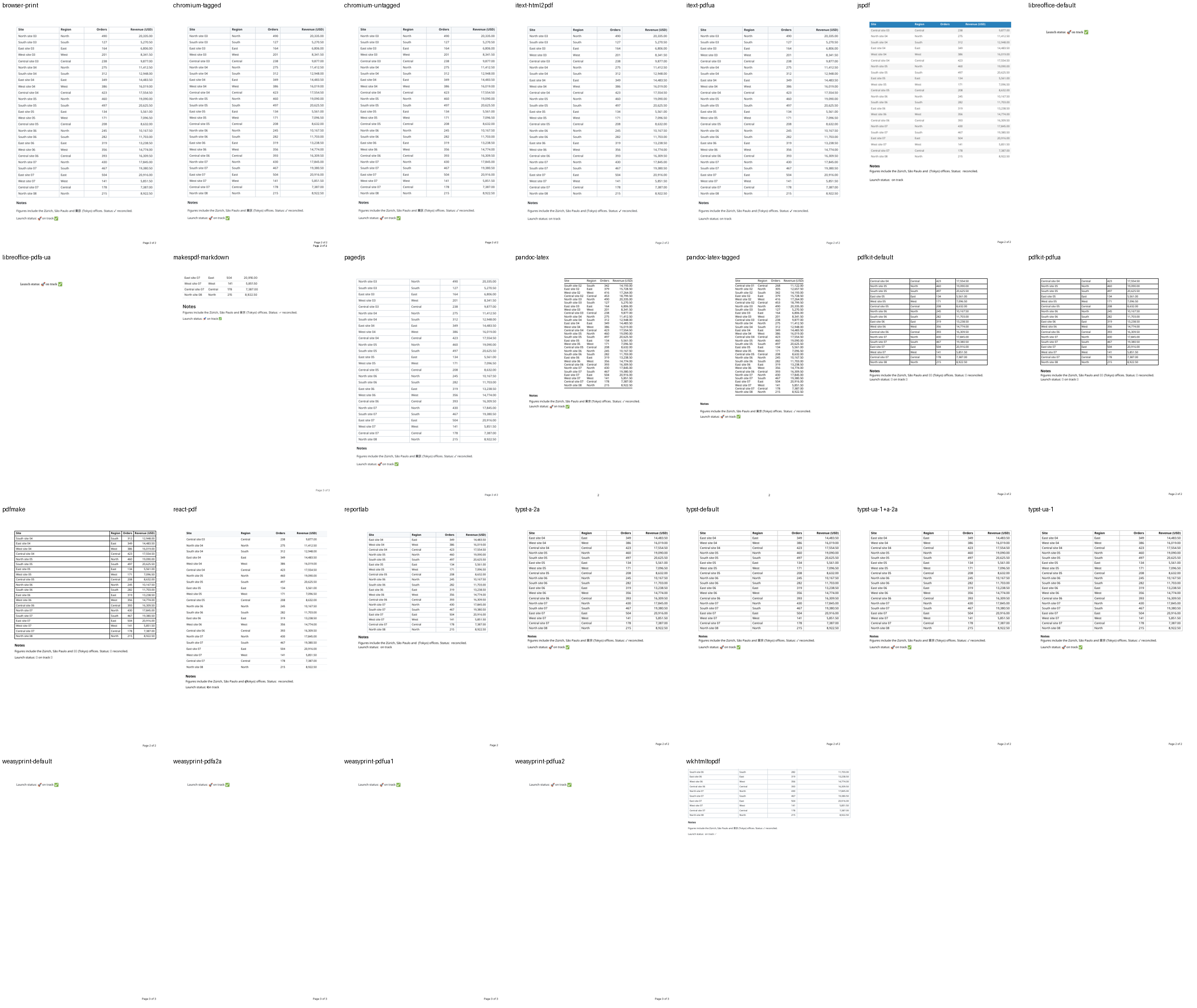
Every tool was given the same two-to-three-page document, Quarterly Field Report:
- H1, H2 and H3 headings
- a paragraph with bold, italic and a hyperlink
- a bulleted list and a numbered list
- a PNG bar chart with alt text
- a 36-row table with right-aligned numbers, long enough to break across a page
- accented and CJK text (Zürich, São Paulo, 東京) plus a check mark (✓)
- colour emoji (🚀 ✅)
- “Page n of N” footers
A few honest caveats to keep in mind when reading these numbers:
- Passing veraPDF is necessary, not sufficient. veraPDF checks the machine-verifiable rules of PDF/UA-1 and PDF/A-2a. It cannot tell whether alt text is actually helpful or whether a multi-column layout reads in a sensible order. Test important documents with a screen reader (NVDA, JAWS or VoiceOver) too.
- PDF/UA-2 numbers are mostly forward-looking. A file declaring PDF/UA-1 automatically fails the PDF/UA-2 identifier rules, so treat UA-2 results in the individual sub-pages as a signal of who is already moving there rather than a grade against UA-1 tools.
- LaTeX was tested on TeX Live 2023. That is old for the LaTeX tagging project; current TeX Live does much better and we will re-run it before publishing the LaTeX sub-page.
- Desktop and login-gated tools are pending manual samples. Microsoft Word, Google Docs, Apple Pages, Safari, Firefox, Canva, Figma, Acrobat Pro and DocRaptor cannot run in a headless Linux test harness, so we are collecting those by hand rather than guessing.
Tested tool versions
| Tool | Version |
|---|---|
| Chromium (Playwright) | 158 |
| WeasyPrint | 70.0 |
| wkhtmltopdf | 0.12.6 (Ubuntu build, unpatched Qt) |
| Paged.js | 0.4.3 |
| Typst | 0.15.2 (PyPI package) |
| Pandoc | 3.1.3 |
| LuaLaTeX | TeX Live 2023 / LaTeX2e 2023-11-01 |
| LibreOffice | 24.2.7 |
| PDFKit | 0.21.0 |
| jsPDF | 4.2.1 (with jspdf-autotable) |
| pdfmake | 0.3.15 |
| @react-pdf/renderer | 4.9.2 |
| ReportLab | 5.1.2 |
| iText | 9.8.1 (with pdfHTML 6.3.4) |
| makesPDF | local pipeline (2026-11-27) |
Pick one of the approaches above to dig into the actual failure rules and trade-offs, or check a PDF from your current pipeline on /validate.